









A visual guide to the numbers on your prescription, the label on your lens box, and the details to check before you order.
To read your contact lens prescription, start with the eye: OD means right and OS means left. Then check the full lens name, power (PWR or SPH), base curve (BC) and diameter (DIA). Toric lenses also use CYL and AXIS; multifocal lenses add an ADD value and sometimes a design code. ACUVUE’s prescription guide explains the core notation.
The next step is making those details line up. Your prescription, lens packaging and online order form may use different layouts or abbreviations. Read one eye at a time, keep every plus or minus sign, and check the entire product name.
First, check which prescription you have
A glasses prescription and a contact lens prescription can share familiar numbers, but they do different jobs. A contact lens prescription identifies the fitted lens as well as its corrective power. A glasses prescription alone does not tell you which contacts will fit.
Look for a contact lens brand and specific product, along with its fitting details. If your document only lists SPH, CYL, AXIS, ADD or a pupillary distance (PD), ask the clinic whether you have the glasses prescription or the completed contact lens prescription. Those headings alone cannot settle it.
Even when the power happens to be identical, you still need the contact lens fitting. Contacts rest on the eye; glasses sit in front of it, which can affect the power needed, especially with stronger prescriptions. An online conversion cannot check how a lens sits, moves or performs on your eye. (Source: ACUVUE, contact lens power guidance).
If you have never worn contacts, our guide to getting contact lenses in Canada covers the exam and fitting process.
Contact lens prescription abbreviations at a glance
Read the column heading before the number. A value of 8.6 under BC describes lens curvature; it is not a prescription strength.
| Label | Meaning | What to check |
|---|---|---|
| OD / R / RE | Right eye | Your right eye, from your perspective. |
| OS / L / LE | Left eye | Keep its values on the left-eye order line. |
| OU | Both eyes | The entry applies to both eyes. |
| PWR / SPH / POWER | Spherical lens power, in dioptres | Copy the sign and number, such as −2.50. |
| BC / BCR | Base curve, in millimetres | Match the fitted product and curve. |
| DIA | Lens diameter, in millimetres | The width of the lens from edge to edge. |
| CYL | Cylinder power for astigmatism | Copy it separately from SPH. |
| AX / AXIS | Orientation of the cylinder correction, in degrees | Copy the angle; it is not another power. |
| ADD | Near addition for a multifocal lens | May be numeric or a label such as Low. |
| Brand / lens name | The fitted product | Include words such as Toric, Multifocal or 1-Day. |
What do plus, minus and plano mean?
In the SPH or PWR field, a minus sign indicates correction for nearsightedness; a plus sign indicates plus lens power, commonly used for farsightedness. A value farther from zero means more spherical power: −4.00 is stronger minus power than −2.00. The sign matters just as much as the digits.
PL or plano means zero spherical power. It does not necessarily mean there is no correction elsewhere: a lens can have zero sphere and still include cylinder for astigmatism. Check the rest of the prescription before drawing a conclusion. (Source: ACUVUE, prescription guide).
What do BC and DIA tell you about fit?
BC describes the lens’s base curve; DIA describes its overall width. They are specifications of the lens, rather than a complete description of your eye. A fitting evaluates the lens on your eye as well as its measurements.
Matching those two numbers is not enough to choose a substitute. Materials and lens designs can differ even when the printed dimensions look alike; the FDA’s lens-buying guidance also cautions against unapproved brand substitutions. Ask your eye care professional to fit an alternative if you want to change products. Health Canada recommends that contact lenses be prescribed and fitted by a qualified eye care professional.
What do CYL and AXIS mean for astigmatism?
CYL is the cylinder power; AXIS tells you its orientation on a 0–180-degree scale. For example, CYL −1.25 and AXIS 180 belong in two separate fields. An axis of 180 does not mean more severe astigmatism than an axis of 90.
Soft toric products commonly list cylinder in minus notation. That minus sign does not, by itself, tell you whether the eye is nearsighted or farsighted. If your paper shows a plus cylinder and the product menu only offers minus values, ask the prescriber to confirm the contact lens specifications. Changing only the sign would change the prescription. (Source: ACUVUE, contact lens power guidance).
Three contact lens prescriptions, read one eye at a time
These are invented learning examples using published product specifications. They show how fields work, not which lenses you should wear. A real prescription also includes patient and prescriber information and dates.
Example 1: A spherical prescription
Suppose the fitted product is Biofinity, with this simplified prescription:
| Eye | PWR | BC | DIA |
|---|---|---|---|
| OD — right | −2.50 | 8.6 | 14.0 |
| OS — left | −2.00 | 8.6 | 14.0 |
The right eye uses −2.50 and the left uses −2.00. The fitting dimensions match across the two eyes, but the powers do not. There is no CYL, AXIS or ADD to enter for this spherical product.
Biofinity’s published specifications list one BC and DIA for this model, so an order form may display those values automatically. A fixed field is expected when the product only comes in that specification. It still needs to agree with the fitted lens. (Source: CooperVision, Biofinity specifications).
Example 2: A toric prescription for astigmatism
Now suppose the fitted product is Biofinity toric:
| Eye | PWR | CYL | AXIS | BC | DIA |
|---|---|---|---|---|---|
| OD — right | −2.50 | −1.25 | 180 | 8.7 | 14.5 |
| OS — left | −2.00 | −0.75 | 170 | 8.7 | 14.5 |
Read the right-eye row as: “Biofinity toric, power minus 2.50, cylinder minus 1.25, axis 180, base curve 8.7, diameter 14.5.” Each value has its own place. You do not add the sphere and cylinder together.
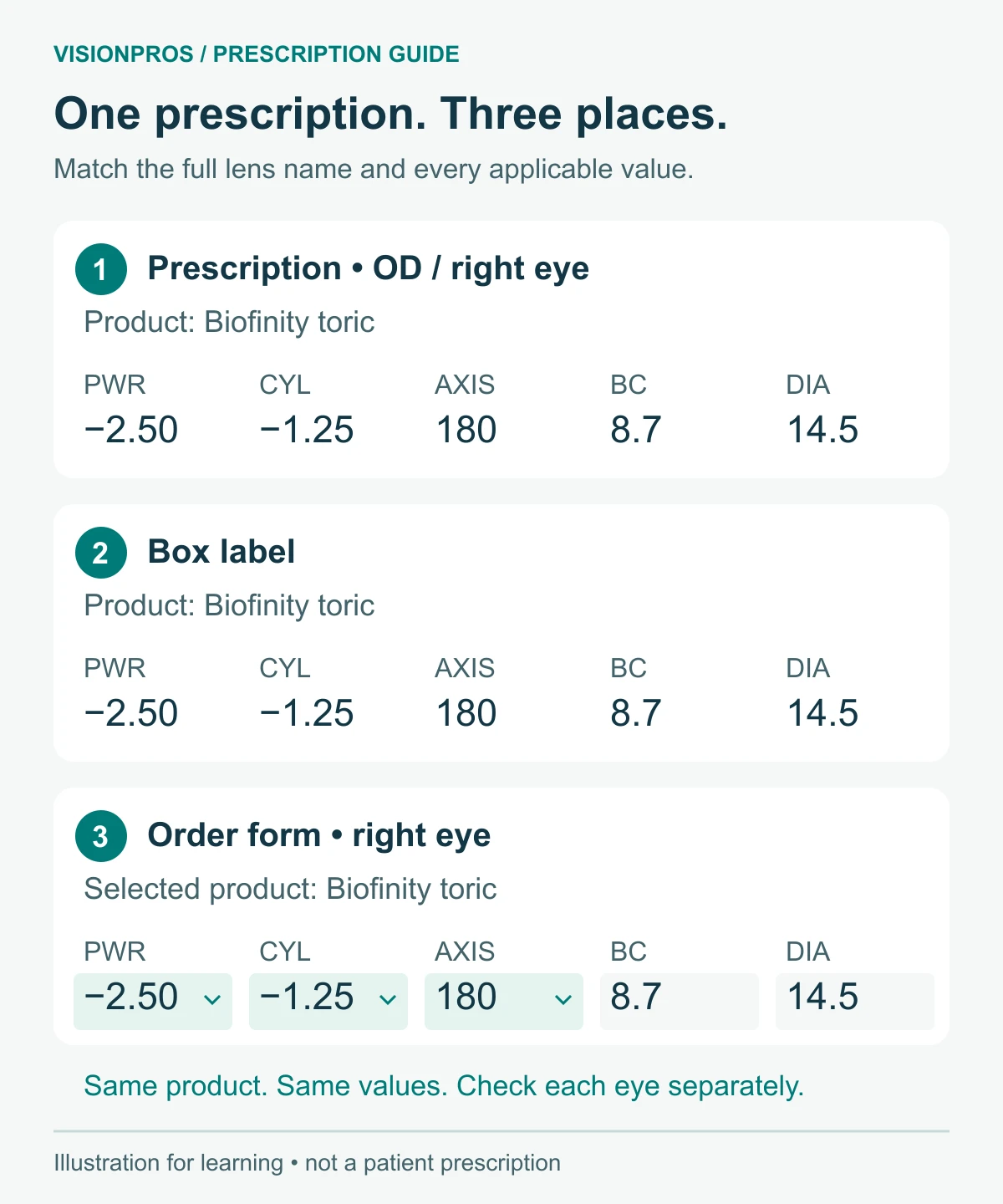
This example also shows why a brand family name is not enough. Biofinity and Biofinity toric have different fitting dimensions and correction fields. The word “toric” changes which product you need. (Source: CooperVision, Biofinity toric specifications).
Example 3: A multifocal prescription with ADD and D/N
Here is a simplified Biofinity multifocal example:
| Eye | PWR | ADD | Design | BC | DIA |
|---|---|---|---|---|---|
| OD — right | −2.50 | +2.00 | D | 8.6 | 14.0 |
| OS — left | −2.00 | +2.00 | N | 8.6 | 14.0 |
For the right eye, enter PWR −2.50, ADD +2.00 and design D. Keep the power and ADD separate; entering −0.50 as the power would not reproduce this prescription. (Source: CooperVision, Biofinity multifocal specifications).
In this lens system, D and N identify distance-centre and near-centre designs. They do not mean right and left, and the assignment in this example is not a rule for everyone. Follow the design prescribed for each eye. (Source: CooperVision, Balanced Progressive Technology).
Other multifocals use categories. MyDay multifocal, for example, lists Low, Mid and High ADD options. Those labels belong to that product’s fitting system. Do not use a glasses ADD or another brand’s label to choose your own category; have the clinic confirm the intended lens option. (Source: CooperVision, MyDay multifocal specifications).
A toric multifocal can include both sets of fields: CYL and AXIS for astigmatism, plus ADD and any required design code. Use the complete fitted specification.
How to read the numbers on your contact lens box
Find the full product name first, then the panel carrying the lens parameters. Compare it with your current prescription. A previous box is a useful reference, but it might represent an older prescription or a trial lens.
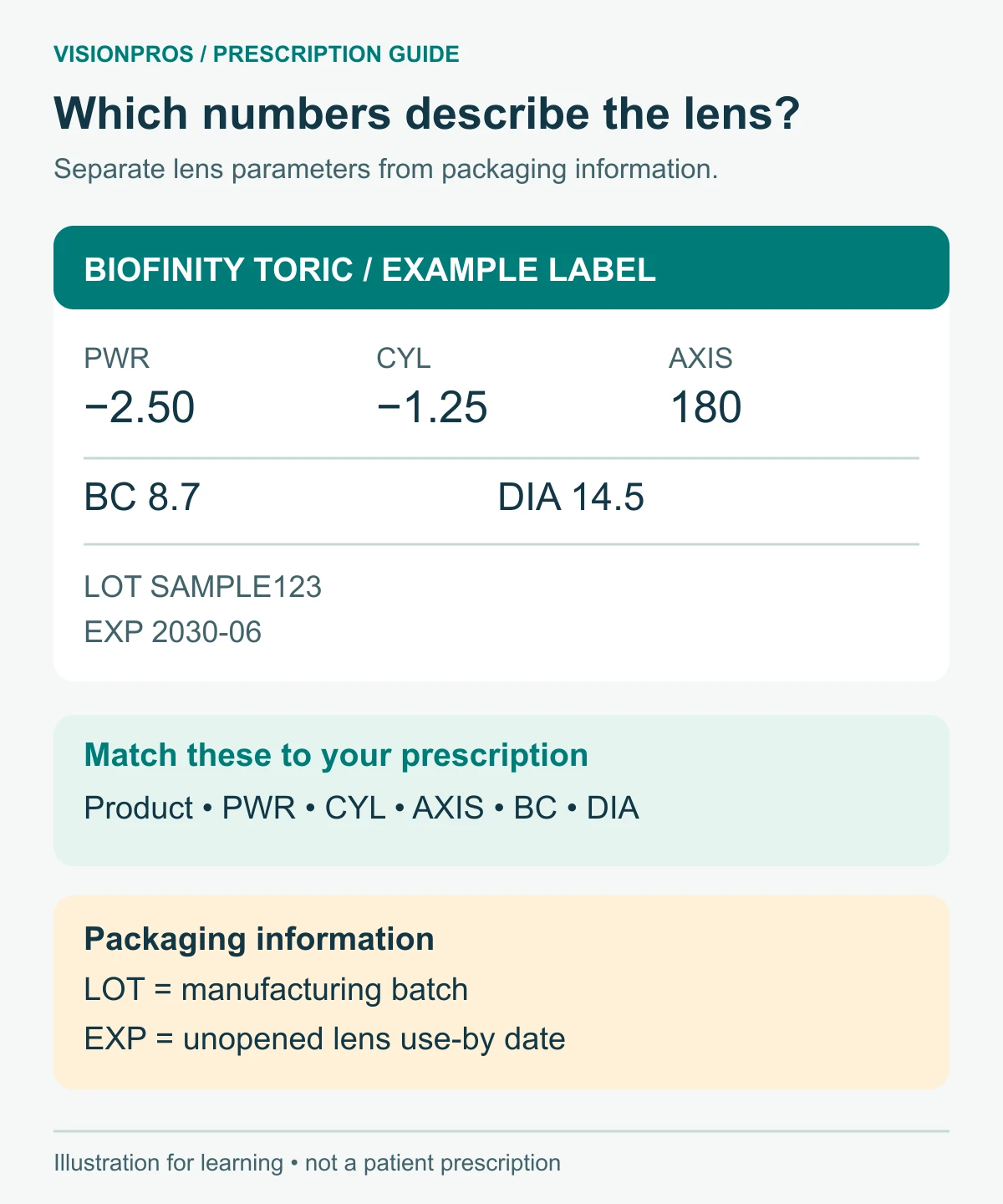
The box may show PWR where the prescription says SPH. AX and AXIS also refer to the same field. A label may print 090 where a form displays 90; that leading zero does not change the angle. Preserve the value rather than copying the typography. (Source: Alcon, Prescription 101).
LOT identifies the manufacturing batch. EXP, or a use-by symbol followed by a date, identifies the product’s expiry. Neither is a power to enter in the order form. The manufacturer’s symbol guide can help if the packaging uses an unfamiliar icon. (Source: ACUVUE, patient instruction guides).
A box’s factory-printed parameters may not say which of your eyes it belongs to. Compare every applicable field with the relevant prescription row before marking the box R or L. Equal sphere powers alone do not establish that the two eyes use identical lenses.
Prescription expiry, lens expiry and replacement schedule are different
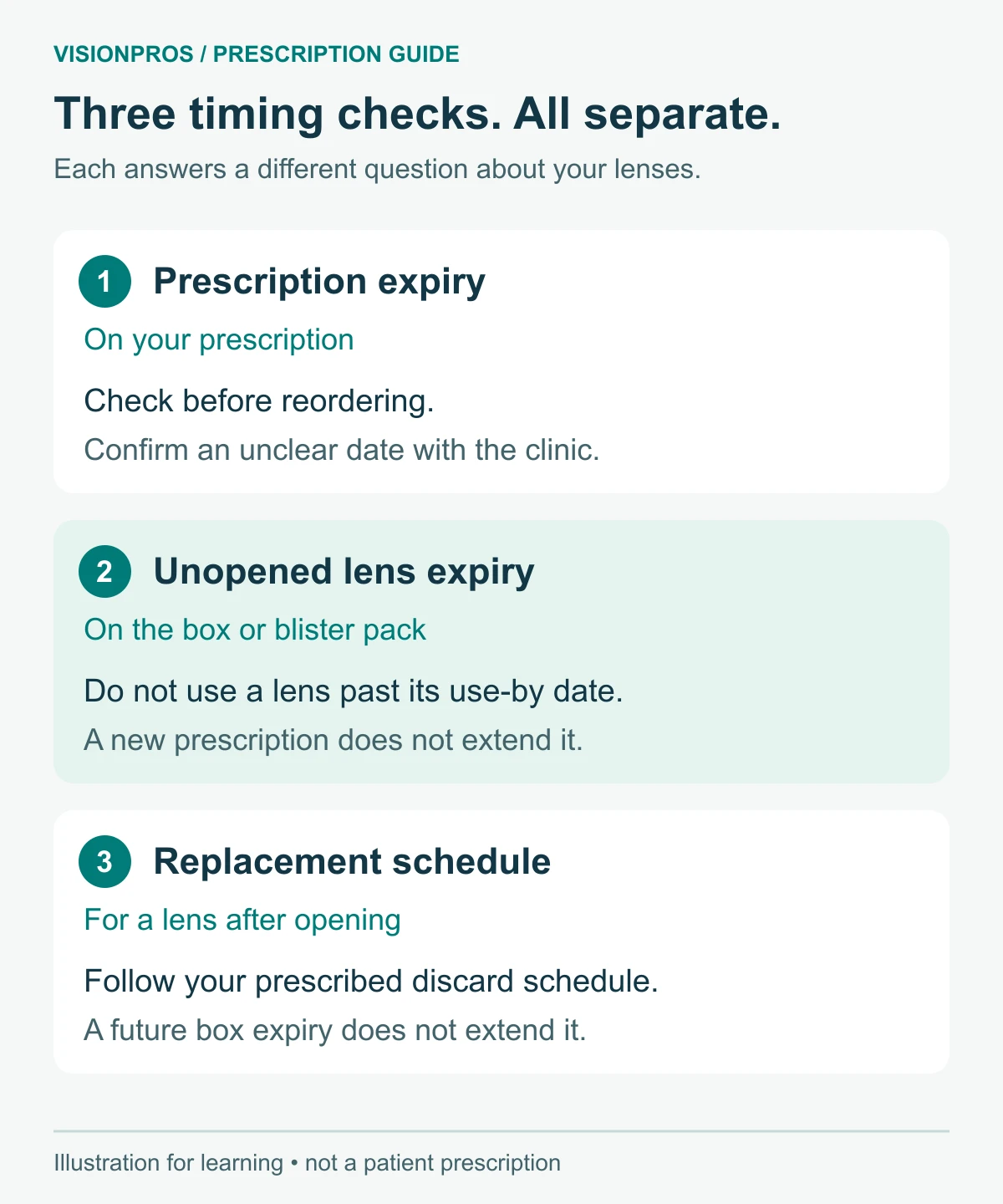
- Prescription expiry is the date on your prescription. Check it before reordering.
- Product expiry is the use-by date on the sealed lens packaging. Do not use lenses after it.
- Replacement schedule tells you when to discard a lens after opening and starting use, following your prescribed routine. Daily disposable, two-week and monthly schedules are not interchangeable.
For example, a monthly lens does not become safe to keep wearing for years because its box has a distant expiry date. Conversely, a newly issued prescription does not make an expired blister pack usable. (Source: ACUVUE, contact lens expiry guidance).
What if your prescription does not match the order form?
A mismatch is a reason to check the document or product selection. Choosing the nearest available number can change what you receive.
| What you see | What to check next |
|---|---|
| There is no CYL or AXIS menu. | Check whether you opened the spherical product instead of its toric version. If the prescription is spherical, those fields are not needed. |
| Your axis or cylinder is missing from the menu. | Confirm the full product and that you are reading the contact lens prescription. Ask the retailer to check availability and the prescriber to resolve any specification mismatch. Do not round. |
| BC or DIA is fixed, or there is no dropdown. | The product may have one available size. Check its published details against the fitted lens; do not change brands just to find an editable field. |
| Your prescription has a number for ADD, but the menu has Low, Mid or High. | Ask the clinic for the exact ADD label for that product. A general conversion table cannot establish your fitted option. |
| Your prescription and last box disagree. | Check the prescription date and whether the box was a trial or an older supply. Have the clinic confirm the final lens before reordering. |
| One eye has CYL and AXIS; the other does not. | Your eyes may use different lens types. Confirm each product separately rather than forcing both rows into one product page. |
| A sign, decimal or handwritten value is unclear. | Request a clear copy. A guessed minus sign or decimal point can produce a different lens power. |
Product menus have genuine limits. For example, standard Biofinity toric lists its axis options in 10-degree steps. That explains why a menu may lack a number, but it does not tell you which alternative would work for your eye. (Source: CooperVision, Biofinity toric parameter range).
Getting a copy and checking expiry in Canada
If you cannot find the right document, ask your clinic for your final contact lens prescription or contact lens specifications, including the product and details for each eye. Asking only for your “eye prescription” can leave it unclear which document you need.
The Canadian Association of Optometrists distinguishes the optical prescription obtained after an eye examination from the fitting needed for contacts. It also explains patients’ access to their records. (Source: Canadian Association of Optometrists, Patient Optometric Records and Prescriptions).
Provincial standards matter. In Ontario, the College’s current standards require a contact lens prescription, including its parameters, to be provided once the necessary prescribing services have been performed; the information may be withheld pending payment for those services. The standards also require prescription and expiry dates. This is Ontario guidance, not a substitute for another province’s rules. (Source: College of Optometrists of Ontario, Optometric Practice Reference, section E.1).
Use the expiry date on your own prescription rather than assuming that every Canadian contact lens prescription lasts one year or two. If the date is missing or unclear, ask the prescriber. Follow the review schedule they recommend, even if you still have lenses left.
At VisionPros, the ordering terms require a recent, valid prescription and the prescribed brand and/or power. A saved order should therefore be compared with your current prescription before you repeat it.
The final check before you order
- Check that you have the final contact lens prescription and that it is current.
- Match the full product name, including the lens type and replacement version.
- Read OD/right and OS/left separately. Copy each power and its sign.
- Match BC and DIA, including any automatically filled values.
- Match CYL and AXIS for toric lenses; ADD and any design code for multifocals.
- Check the number of lenses per box and the quantity ordered for each eye.
Box count is separate from prescription strength. A 30-pack contains 30 individual lenses, not 30 pairs. For daily disposable wear in both eyes, one 30-pack for each eye provides 30 days of pairs.
When the order arrives, repeat the comparison before opening the individual lens packs. If the labels disagree with the prescription, contact the retailer and resolve the difference before wearing them. (Source: FDA, Buying Contact Lenses).
Once those details match, you can find the prescribed product in VisionPros’ contact lens range.
Other questions about reading a contact lens prescription
Is PWR the same as SPH?
On common soft contact lens labels, PWR and SPH identify the spherical power field. CYL and ADD remain separate where applicable; do not combine them into PWR.
Does a blank CYL field mean my prescription is incomplete?
Not necessarily. A spherical soft lens has no separate cylinder or axis entry. If the product is toric and a required value is missing, ask the prescriber to confirm it. A blank field alone does not establish whether you have astigmatism.
Why is there no PD field for contact lenses?
Pupillary distance helps position spectacle lenses in front of your eyes. Standard soft contact lens ordering uses the fitted lens specifications instead. PD cannot fill in a missing BC or DIA. (Source: Canadian Association of Optometrists, Patient Optometric Records and Prescriptions).
Can I use this guide for rigid, scleral or orthokeratology lenses?
This guide focuses on commonly ordered soft lenses. Specialty lenses can require additional fitting parameters and individual designs. Ask your fitter to explain that specification rather than trying to fit it into a standard soft-lens order form. Health Canada describes specialist fitting for orthokeratology.
What if the numbers match but my vision is blurry or my eye hurts?
Matching labels cannot rule out a fit or eye-health problem. Remove the lenses and contact your eye care professional promptly if you have pain, redness, light sensitivity or a change in vision. Do not try to solve the symptoms by ordering a stronger power. (Source: ACUVUE, patient instruction guides).